SCSI Driver Interface
The SCSI Driver is an important open software interface (API) for accessing a wide range of peripheral devices, not just SCSI devices. SATA drives for optical media (e.g. DVDs and BDs) and USB mass storage devices also use the SCSI command set. For other hardware interfaces, SCSI commands can be emulated, just as HDDRIVER does for IDE and SATA hard drives. SCSI Drivers can be used to send any SCSI command to almost any interface. Several SCSI drivers can coexist.
HDDRIVER's usage of SCSI Drivers
Internally, HDDRIVER consists of two driver layers: The SCSI Driver and the hard disk driver, which accesses devices exclusively via SCSI Drivers. These drivers can be one of HDDRIVER's built-in SCSI Drivers (for ACSI/SCSI/IDE/ATAPI/SATA), a third-party SCSI Driver, e.g. for USB, or a combination. If a SCSI Driver for bus 0 (ACSI), 1 (SCSI) or 2 (IDE) already exists when starting HDDRIVER, HDDRIVER automatically uses the existing SCSI Driver instead of its own to access this bus, as required by the SCSI Driver specification.
A Milan with PCI SCSI card provides a good example: For SCSI devices, HDDRIVER uses the Milan's PCI SCSI Driver, which is already available when booting. For IDE devices, HDDRIVER uses its own SCSI Driver for Milan IDE. With MagiCMac, MagiCPC, Hatari and ARAnyM it is similar, provided that HDDRIVER is launched after the SCSI Driver for the respective platform.
Standard Interface
HDDRIVER fully supports the current version 1.01 of the SCSI Driver interface. A small weakness of this interface is the limitation to LUNs 0-7 (SCSI sub-units) per device, although SCSI (but not ACSI) allows 32 LUNs. Thanks to a backward compatible extension for the SCSI Driver interface, all 32 SCSI LUNs can be used with HDDRIVER's SCSI Driver. Devices with more than 8 LUNs are supported by SCSI2Pi, for example.
Target Interface
HDDRIVER is the only driver that supports the SCSI Driver target interface: A TT or Falcon is detected as SCSI device by other computers (including non-Ataris) and can execute standardized or self-defined SCSI commands.
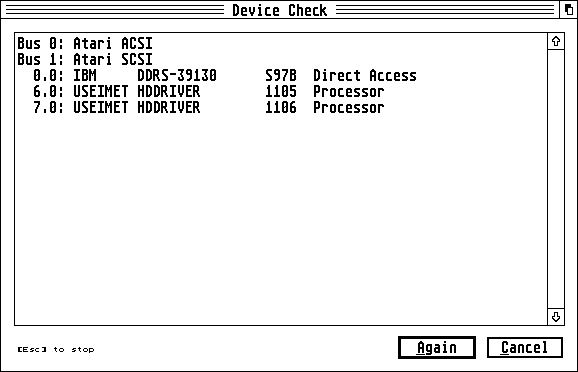
The screenshot shows the device check of a TT, with a Falcon on the same bus. The TT (SCSI ID 7) is running HDDRIVER 11.06, the Falcon (SCSI ID 6) is running HDDRIVER 11.05. Both computers "see" each other, and one can execute SCSI commands sent by the other.
Sample code in C for implementing custom SCSI commands is provided on GitHub. For the target interface to function correctly, any software that accesses SCSI peripherals must do so via the SCSI Driver interface.
In the HDDRUTIL settings, you can configure whether HDDRIVER shall be installed with or without target interface support. Without target support, HDDRIVER uses about 3 KiB less RAM.
Implementations
Fully functional SCSI Drivers are available for the following hardware interfaces and emulators:
| Hardware/Emulator | Software Package | Author | Remark |
|---|---|---|---|
| Atari ACSI/SCSI/IDE | HDDRIVER CBHD/SCSIDRV.PRG |
Uwe Seimet Claus Brod, Steffen Engel |
Integrated in HDDRIVER |
| Atari ATAPI/SATA | HDDRIVER | Uwe Seimet | Integrated in HDDRIVER |
| Milan IDE/ATAPI/SATA | HDDRIVER | Uwe Seimet | Integrated in HDDRIVER |
| Milan SCSI | Milan PCI SCSI Driver | Michael Schwingen | Open Source |
| MagiCMac | MM_SCSI.PRG | Steffen Engel, Thomas Tempelmann | |
| MagiCPC | SCSIDRIV.DLL | Steffen Engel | |
| Hatari (Linux SCSI/IDE/ATAPI/SATA/USB) | NF_SCSI, see below | Uwe Seimet | Open Source |
| ARAnyM (Linux SCSI/IDE/ATAPI/SATA/USB) | NF_SCSI, see below | Uwe Seimet, Thorsten Otto | Open Source |
When implementing a new SCSI Driver, it is recommended to not only read the SCSI Driver specification but also the official SCSI standards and to make use of the test suite. Information on the SCSI Driver interface is also provided in some of my papers for the German ST Computer magazine.
Buses and Bus Numbers
Depending on the drivers installed, these buses can exist:
| Bus Number | Bus | XHDI Major Device IDs | Remark |
|---|---|---|---|
| 0 | ACSI | 0-7 | According to SCSI Driver specification |
| 1 | SCSI | 8-15 | According to SCSI Driver specification, also for Milan SCSI (PCI)/MagiCMac/MagiCPC |
| 2 | IDE | 16-23 | According to SCSI Driver specification, also for ATAPI/SATA |
| 3 | SD | 24-31 | SD card slot (FireBee bus IDE2 and Vampire). The FireBee SCSI Driver unfortunately has known bugs. |
| 4 | USB | 32-39 | USB storage driver. It is important to use the latest version. Unfortunately also this version has known bugs (SCSI Driver, XHDI, media change). The authors of this driver know all these bugs. |
| 7 | Ramdisk | 56-63 | SCSI compatible ramdisk e.g. with HDDRIVER 13 |
| 8 | Floppy | 64-71 | See XHDI specification. There is no SCSI Driver yet. |
| 30 | Linux SG Driver, Bus A | 240-247 | SCSI Driver for Hatari and ARAnyM (/dev/sg0-/dev/sg7) |
| 31 | Linux SG Driver, Bus B | 248-255 | SCSI Driver for Hatari and ARAnyM (/dev/sg8-/dev/sg15) |
By convention, the unique base ID of each XHDI Major Device ID is derived from the bus number * 8, in order to avoid dangerous ID conflicts.
Some buses do not support data transfers from/to odd memory addresses. Therefore, never use odd addresses, regardless of the bus.
SCSI Driver and Firmware Test Suite
Several open documents specify in detail how to develop device drivers for the Atari. Deviations from these specifications can lead to malfunctions and even data loss.
The test suite (see download area) is a collection of open source tools for testing SCSI firmware/emulations (especially SCSI-2 and newer) and some SCSI Driver functions, also for SCSI Drivers for IDE/SATA or USB. The compatibility with SCSI-2 and newer is tested, not the compatibility with HDDRIVER. The latter results from SCSI compatibility.
HDDRIVER is not required for these tests, but only a SCSI Driver for the buses/devices to be tested.
The test suite comprises these programs, each with its own version number:
- SDRVTEST.TOS: Tests SCSI Driver implementations and tests devices against the SCSI specification. In addition, many device properties are displayed. These tests are also integrated in HDDRUTIL 13.
- SERRTEST.TOS: Tests the basic error handling of SCSI Drivers.
- ERRTEST.TOS: Tests whether a SCSI Driver correctly detects a media change.
- MCHGTEST.TOS: Tests whether a device correctly reports a media change.
The tests do not modify any data. SERRTEST, ERRTEST and MCHGTEST list the available buses and expect the input of bus and device IDs. SDRVTEST tests all devices present.
Please contact me if you find a test where the expected result does not comply with the SCSI Driver specification or the SCSI standard. The source code of all programs is available on GitHub, so that you can see exactly what is tested and how.
Some SD card readers for ACSI fail the media change test MCHGTEST. With this hardware, hot-swapping of SD cards may result in data loss. There is no such bug with real physical removable media drives (SyQuest, ZIP, JAZ, ...) and also not with UltraSatan and GigaFile. By the way, hot-swap has been supported by correctly working drives and drivers for decades, even by AHDI.
Some drivers have bugs, which are not found by the test suite, but which can also lead to errors after media changes. For HDDRIVER, ICDBOOT, CBHD, HuSHI and AHDI, no such bugs are known, but unfortunately there are bugs in some open source drivers. The developers of the projects in question are aware of the bugs in their drivers (especially SCSI Driver and XHDI) and would probably appreciate help.
The example logfile of SDRVTEST shows test results of HDDRIVER with devices that pass all tests: An IBM DDRS-39130 hard drive, a removable media drive emulated by SCSI2Pi, a streamer emulated by SCSI2Pi and the SCSI Driver target interface of HDDRIVER.
 Example logfile of SDRVTEST
With the test suite and Hatari or ARAnyM and the SCSI Driver for Linux, you can also test native Linux devices. The following logfile tests an emulated IDE drive and a real NVMe-SSD connected by a USB-to-NVMe adapter.
In a logfile, each bug is marked with "ERROR". SDRVTEST tries to differentiate as accurately as possible between bugs in the SCSI Driver and bugs in the device firmware.