Integrated Ramdisk
HDDRIVER 13 supports a next-generation ramdisk with a size of up to 255 MiB. The size is configurable in increments of 1 MiB. This ramdisk works with any Atari, clone or emulator. It runs with any TOS, MagiC and MiNT, and thanks to ETOS_FIX even with EmuTOS.
Not a Ramdisk like any other
The HDDRIVER ramdisk does not just behave like a drive, but it actually is a virtual full-featured SCSI hard drive. Applications cannot tell any difference between a real drive and the ramdisk. Therefore, it offers a better and more elegant system integration than any previous ramdisk.
The ramdisk uses SCSI ID 0, LUN 0 on bus 7, the ramdisk bus. You configure the ramdisk drive with "Devices and Partitions".
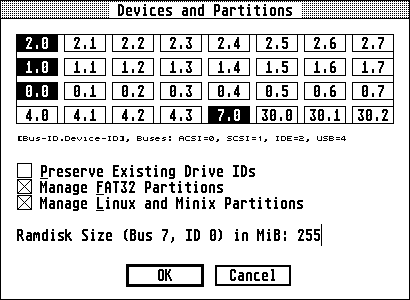
If ID 7.0 is not listed, just edit an unused bus and device ID in the device details (see below). The ramdisk bus is always present, even when there is no ramdisk. This behavior is consistent with a physical bus, which exists even when no device is connected.
Like any other drive managed by HDDRIVER, the ramdisk offers unrestricted SCSI Driver and XHDI support. Therefore, it is presumably the only universal ramdisk that also works with MiNT. When Alternate-RAM is available, the ramdisk is automatically created in Alternate RAM, not only because of speed (in case Alternate-RAM is Fast-RAM), but also because usually there is more Alternate-RAM than ST-RAM. The ramdisk is not reset-persistent. It is partitioned in SuperFloppy format, so it does not use a partition table.
Of course, the HDDRIVER ramdisk passes the SCSI Driver and Firmware Test Suite.
Ramdisk as Drive B:
Like any other drive, after a double click on the ramdisk ID in "Devices and Partitions", you can assign the ramdisk a fixed drive ID in the "Device Details". It can be convenient to assign the ramdisk the often unused drive B:.
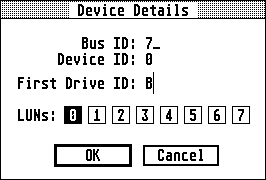
With this setting the ramdisk does not allocate any of the usual hard drive IDs and always has the same drive ID, regardless of how many physical devices are present. If B: is already used by a second floppy drive, consider using the last ID supported by your operating system, i.e., P: with TOS, or 6: with MagiC or MiNT. If there is no floppy drive at all, you can absolutely use A: as the ramdisk ID.